Create a Roblox VIP Door with a Game Pass
Check Game Pass ownership on the server and use collision groups so guests stop at a VIP door while members can walk through.
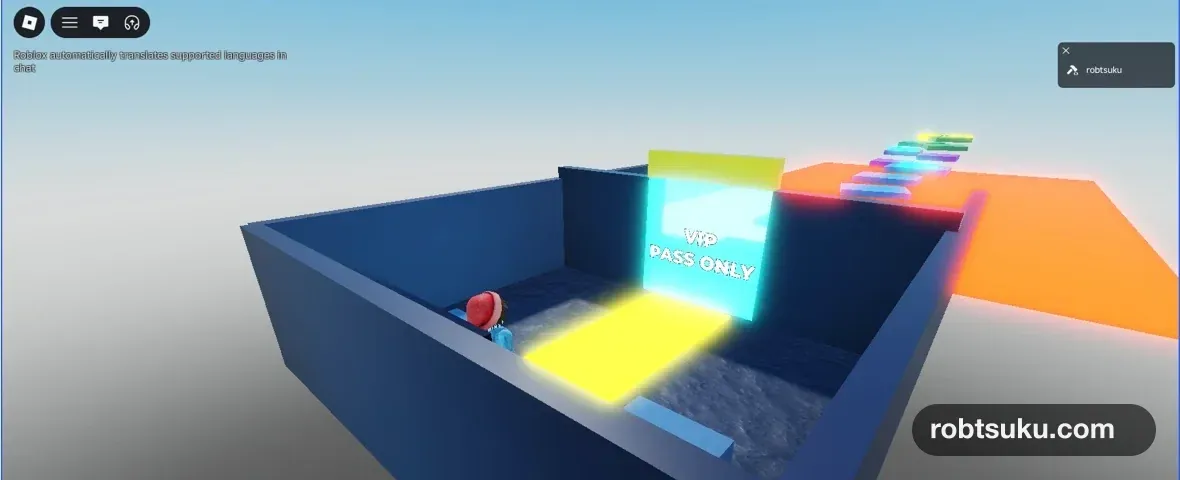
Build a cyan VIP door that blocks guests and lets Pass owners walk through. You will reproduce both states with a server-owned Studio test setting, so completing the guide costs no Robux and requires no real purchase.
The final test uses the same entrance twice. With the test setting off, the character stops outside. With it on, the character crosses the door and reaches the VIP area. Production servers ignore that Studio setting and check ownership with Roblox’s server API.
Allow about 8 minutes. You need a game that you own and have already published. Complete Publish a Roblox Game Privately first if needed. Roblox Studio Parts and Make Deadly Lava with Luau cover Part and server Script basics.
1. Create a Pass in Creator Dashboard
Open the published game in Creator Dashboard and go to Monetization > Passes. Click Create pass, enter a Name and Description, then create it. If the form allows an empty icon, you may leave it blank; the icon is not part of this guide’s completion check.
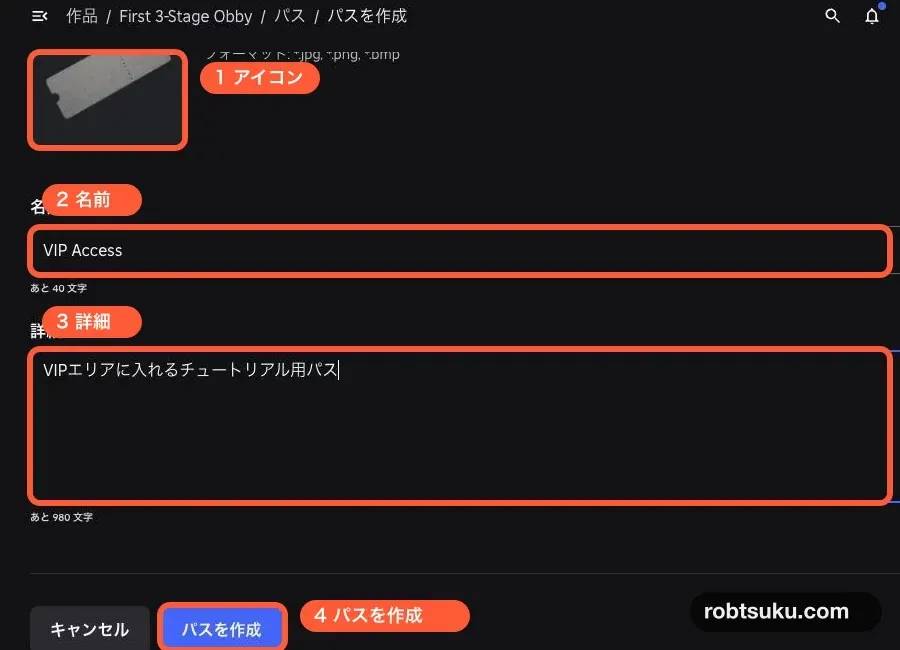
Figure guide: Markers 1–4 identify the optional icon, Name, Description, and Create pass controls in that order.
Roblox’s Pass creation guide also requires the game to be published before a Pass can be created.
Hover over the new Pass, open its ⋯ menu, and choose Copy Asset ID. The copied number is the Pass ID. Keep it in a temporary note; you will replace PASS_ID with that number.
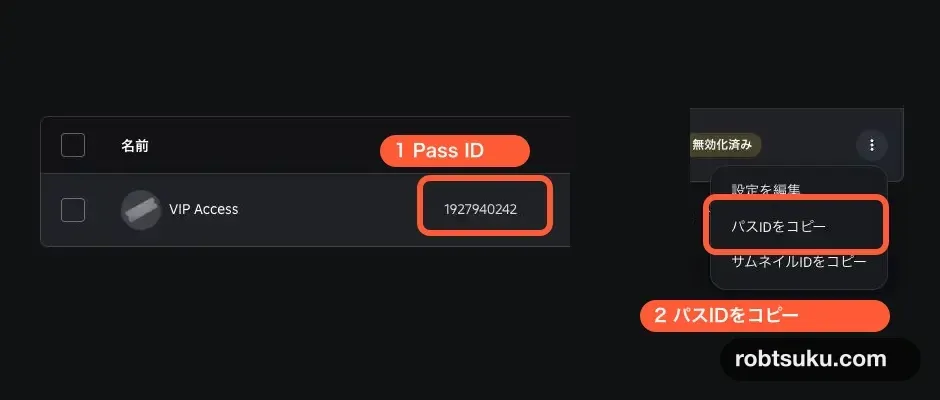
Figure guide: Marker 1 surrounds the numeric Pass ID. Marker 2 marks the menu command that copies that ID.
Do not configure the price yet. The next guide handles the on-sale setting and in-game purchase button.
Tip: A Pass is a one-time purchase for lasting access
Passes fit privileges such as a VIP area. A Developer Product is different: players can buy that product repeatedly, for example to receive more in-game currency. This guide creates no purchase and uses only a Studio access test.
2. Build VipDoor
Return to Studio. Add a Part to Workspace, rename it VipDoor, and resize it to cover the entrance. Turn Anchored and CanCollide on. A bright cyan color makes the gate easy to distinguish from the surrounding walls.
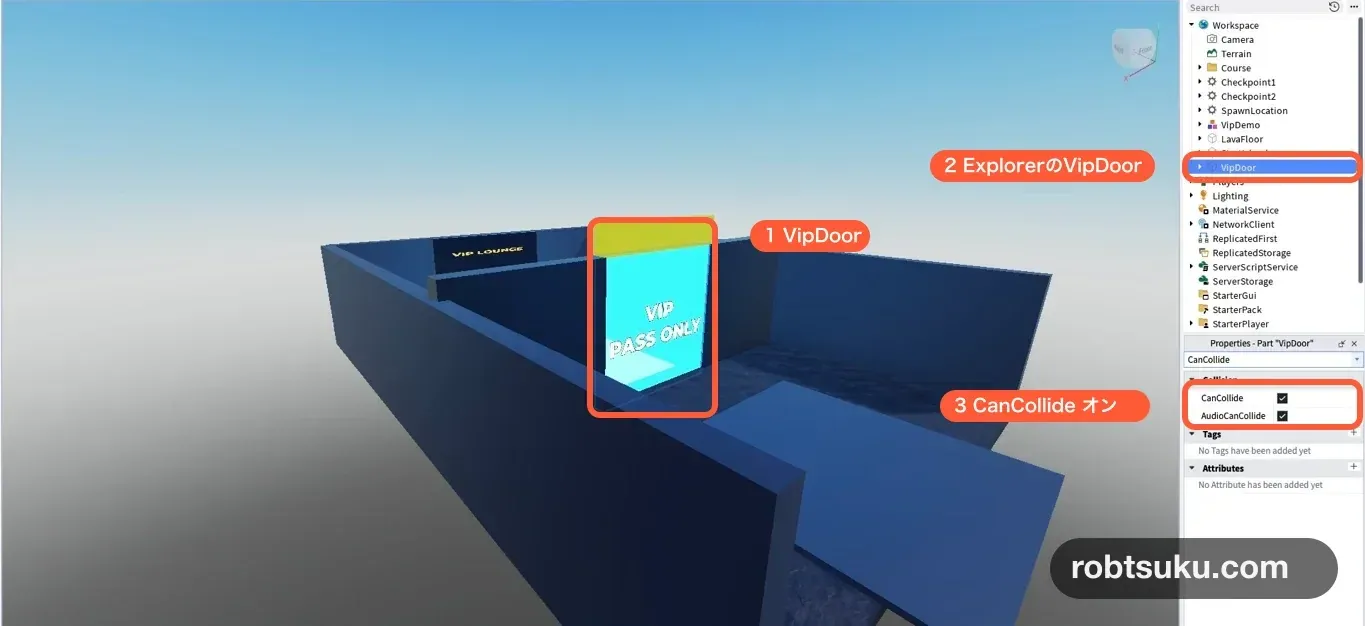
Do not turn CanCollide off when one VIP approaches. That would open the Part for everyone at the same moment. Instead, use collision groups so the server can decide which combinations of objects collide.
Tip: Collision groups control which kinds of Parts collide
This guide creates three categories.
VipVisitorscollide withVipDoor, whileVipMembersdo not. Both groups still collide with the ordinary floor and walls.
3. Add the VipAccess server Script
Add a normal Script to ServerScriptService, rename it VipAccess, delete the starter code, and paste the following.
Tip: A comment is a note for people
In Luau,
--makes the rest of that line a comment. Roblox does not execute it. Inlocal PASS_ID = 1234567890 -- VIP Access Pass ID, the number is code and the words to its right are only a note.
local MarketplaceService = game:GetService("MarketplaceService")
local PhysicsService = game:GetService("PhysicsService")
local Players = game:GetService("Players")
local RunService = game:GetService("RunService")

local PASS_ID = 0 -- Replace with the Pass ID you copied
local STUDIO_TEST_OWNED = false

local GUEST_GROUP = "VipVisitors"
local MEMBER_GROUP = "VipMembers"
local DOOR_GROUP = "VipDoor"
local vipDoor = workspace:WaitForChild("VipDoor")

local function ensureCollisionGroup(groupName)
	if not PhysicsService:IsCollisionGroupRegistered(groupName) then
		PhysicsService:RegisterCollisionGroup(groupName)
	end
end

ensureCollisionGroup(GUEST_GROUP)
ensureCollisionGroup(MEMBER_GROUP)
ensureCollisionGroup(DOOR_GROUP)
PhysicsService:CollisionGroupSetCollidable(GUEST_GROUP, DOOR_GROUP, true)
PhysicsService:CollisionGroupSetCollidable(MEMBER_GROUP, DOOR_GROUP, false)
vipDoor.CollisionGroup = DOOR_GROUP

local function setCharacterGroup(character, hasVipPass)
	local groupName = hasVipPass and MEMBER_GROUP or GUEST_GROUP
	for _, descendant in character:GetDescendants() do
		if descendant:IsA("BasePart") then
			descendant.CollisionGroup = groupName
		end
	end
end

local function ownsVipPass(player)
	if RunService:IsStudio() then
		return STUDIO_TEST_OWNED
	end

	if PASS_ID <= 0 then
		warn("Replace PASS_ID with the Pass ID you created")
		return false
	end

	local success, ownsPass = pcall(function()
		return MarketplaceService:UserOwnsGamePassAsync(player.UserId, PASS_ID)
	end)
	if not success then
		warn("Pass ownership check failed:", ownsPass)
		return false
	end
	return ownsPass
end

local function setVipAccess(player, hasVipPass)
	local hasVipPassValue = player:FindFirstChild("HasVipPass")
	if hasVipPassValue then
		hasVipPassValue.Value = hasVipPass
	end
end

local function setupPlayer(player)
	if player:FindFirstChild("HasVipPass") then
		return
	end

	local hasVipPassValue = Instance.new("BoolValue")
	hasVipPassValue.Name = "HasVipPass"
	hasVipPassValue.Value = false
	hasVipPassValue.Parent = player

	local function setupCharacter(character)
		setCharacterGroup(character, hasVipPassValue.Value)
		character.DescendantAdded:Connect(function(descendant)
			if descendant:IsA("BasePart") then
				descendant.CollisionGroup =
					hasVipPassValue.Value and MEMBER_GROUP or GUEST_GROUP
			end
		end)
	end

	player.CharacterAdded:Connect(setupCharacter)
	hasVipPassValue:GetPropertyChangedSignal("Value"):Connect(function()
		if player.Character then
			setCharacterGroup(player.Character, hasVipPassValue.Value)
		end
	end)

	if player.Character then
		setupCharacter(player.Character)
	end
	setVipAccess(player, ownsVipPass(player))
end

Players.PlayerAdded:Connect(setupPlayer)
for _, player in Players:GetPlayers() do
	task.spawn(setupPlayer, player)
end
Replace only the 0 in PASS_ID = 0 with the number copied from your own Pass.
Set the three collision rules
ensureCollisionGroup() registers each group only when needed. These two lines define the gate:
PhysicsService:CollisionGroupSetCollidable(GUEST_GROUP, DOOR_GROUP, true)
PhysicsService:CollisionGroupSetCollidable(MEMBER_GROUP, DOOR_GROUP, false)
Guests collide with the door; members do not. The Script does not change the character’s collision with the floor or ordinary walls. Roblox’s PhysicsService reference documents group registration and collision relationships.
Put every character Part in the same group
A Roblox character includes the torso, head, limbs, and accessory Parts. setCharacterGroup() assigns every current BasePart to the guest or member group.
An accessory can load after the character first appears, so DescendantAdded assigns later Parts too. Without it, the body may cross while a hat or another accessory catches on the door. CharacterAdded repeats the setup after a respawn.
Keep HasVipPass under server control
HasVipPass is a server-created BoolValue: true means the current Player has VIP access, and false means they do not. When its Value changes, the Script immediately reapplies the correct collision group to the current character.
The next guide will route a completed Studio purchase test through the same server function. The door code does not need to trust a GUI or a value sent by the client.
In Studio, ownsVipPass() returns STUDIO_TEST_OWNED. In production, the RunService:IsStudio() branch is skipped, and the server calls UserOwnsGamePassAsync(). An unset ID or failed API request returns false and keeps the gate closed.
Important: The door is a gameplay entrance, not the final security boundary
Players control parts of their character physics. Check
HasVipPassagain on the server before granting VIP items, rewards, teleports, or saved-data changes. Roblox’s network ownership guidance explains why important movement and physics results need server validation.
4. Test guest and member access in Studio
Leave STUDIO_TEST_OWNED = false, press Play, and walk straight into the door. The character should stop at its outside face.
This false value reproduces the guest branch even if the creator account owns the real Pass. It is a Studio test state, not proof about the account’s Roblox inventory.

Press Stop, change STUDIO_TEST_OWNED to true, and start a new Play. Walk through the same entrance from the same direction. The character should cross the door and reach the inside area.

The two tests are easiest to compare from the same SpawnLocation and approach angle. A small floor marker in front of the entrance can help you begin both runs from the same point.
When the owned test passes, press Stop and restore STUDIO_TEST_OWNED = false. The setting only affects Studio, but leaving the safe default in the saved edit state prevents a later test from starting with unexpected access.
If the door behaves incorrectly
- The owned Studio test is still blocked: Check the exact
VipDoorname and setSTUDIO_TEST_OWNED = truefor that Play. - Everybody passes through: Turn
VipDoor.CanCollideon and confirm the Part’s CollisionGroup becomesVipDoor. - Output shows a red error:
VipAccessmust be a normal Script inServerScriptService, not a LocalScript. - Only accessories catch: Keep the
DescendantAddedconnection and restart Play. - The ownership API fails: Leave access closed, correct the Pass ID or connection problem, and begin a new Play.
Completion check
Workspacecontains an Anchored, collidable Part namedVipDoor.ServerScriptServicecontainsVipAccess.- The false Studio test stops outside the entrance.
- The true Studio test crosses the same entrance.
- The saved edit state is restored to
STUDIO_TEST_OWNED = false. - No Pass was purchased and no Robux was spent.
The server now lets each player through the door only when their Pass state allows it. Add an in-game Pass purchase button next.
Official sources
Sell Coins with a Roblox Developer Product
Create a repeatable 100-coin product, grant and save it through ProcessReceipt, and prevent one PurchaseId from awarding coins twice.
Build this feature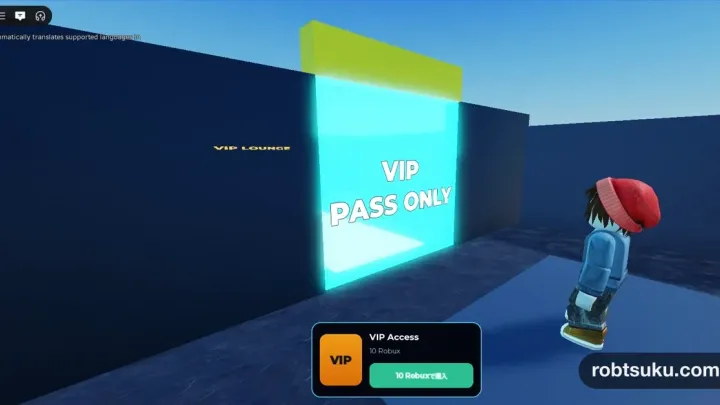
Add a Game Pass Purchase Button in Roblox
Show a Pass name and current price in an in-game card, open Roblox’s purchase prompt, and apply owned UI through a server test.
Build this feature